
Meter infrastructure data sheets
- SENSUS Guarantee for Tokara Body Corporate
- MTR 1000 IEC Single Phase Smart Meters
- MTR 3000 Series IEC Poly Phase Smart Meters
- MTR 3500 Series CT Poly Phase Smart Meters
- DCN 1000 Control Point Module
- iPERL electromagnetic water meter
- MeiStream Plus Bulk Water Meter
MTR 1000 IEC Single Phase Smart Meter meter display
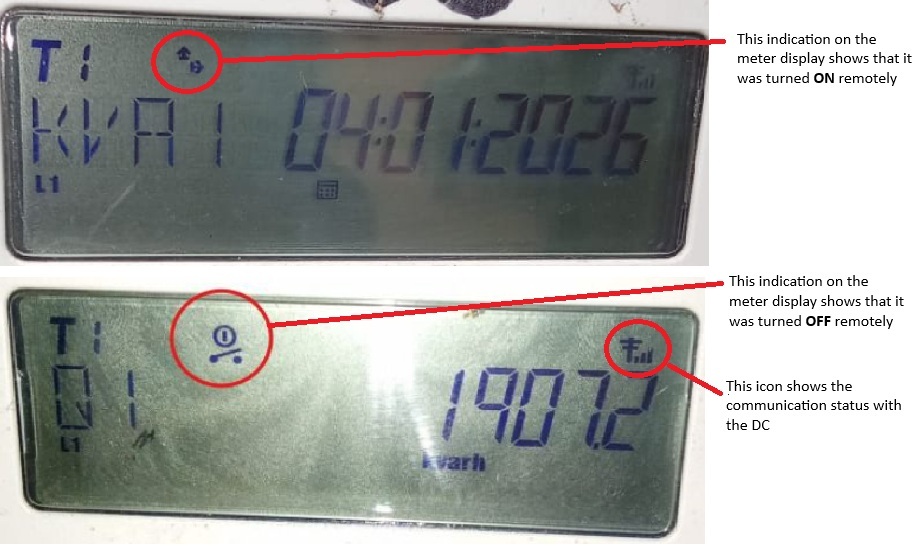
LCD Display
The meter includes a liquid crystal display (LCD) screen on the front panel for showing real-time data, status, and codes. It is a segmented display that cycles through various readings, often activated or navigated via a “Display Cycle” button (labeled with a cycle arrow symbol, as seen on product images). The display may be backlit as an optional feature for better visibility in low-light conditions (e.g., indoor installations). The LCD shows numerical values, units, and icons/symbols.
- General Display Behavior:
- The screen automatically cycles through readings every few seconds or can be manually advanced using the display cycle button.
- It displays up to 6-8 digits for values, along with units (e.g., kWh, V, A) and status icons.
- In normal operation, it shows consumption data; in error states, it may flash or display specific codes.
- Common Indicators and Codes on the LCD: While exact icons can vary, based on similar NES/IEC-compliant single-phase smart meters and general smart meter documentation, the LCD typically includes the following elements (extrapolated from product images and related meter behaviors):
- Energy Consumption (kWh): Displays total accumulated active energy (e.g., “1234.56 kWh”). May include separate registers for import/export if bidirectional metering is enabled (e.g., for solar setups).
- Voltage (V): Shows current line voltage (e.g., “230 V”). Flashing may indicate over/under-voltage conditions.
- Current (A): Displays instantaneous current draw (e.g., “5.2 A”).
- Power (kW or W): Real-time power usage (e.g., “1.2 kW”).
- Time/Date: Clock display for time-of-use (TOU) tariffs, showing current time or tariff period (e.g., peak/off-peak).
- Tariff Indicators: Icons or codes like “T1”, “T2” for multi-tariff modes, indicating the active billing rate based on time, day, or season.
- Relay/Load Control Status: An icon (e.g., “I” for on, “O” for off) or code showing the status of the integrated disconnect switch (remote controllable by the utility for prepay or load management). May flash if disconnected due to non-payment or overload.
- Communication Status: An icon (e.g., signal bars or “COMM”) indicating power line communication (PLC) status via OSGP protocol. Steady on for connected; flashing for attempting connection; off for no communication.
- Tamper/Alarm Icon: A warning symbol (e.g., exclamation mark or “ALARM”) that lights up or flashes if tampering is detected (e.g., cover opened, magnetic interference, or reverse connection).
- Battery Icon: Appears or flashes if the internal clock battery is low (may accompany error codes like “Err-04”).
- Error Codes: Alphanumeric codes for faults, such as:
- Err-01: Potential abnormality in the internal switch or relay; may appear after 1 kWh usage and clear on power cycle or utility intervention.
- Err-04: Low clock battery voltage, indicating a need for replacement to maintain accurate time-stamping.
- Err-56: Reverse energy flow (e.g., wiring reversed or unexpected export); may flash a direction arrow icon.
- Other possible codes (e.g., “Err-XX” for system errors like RAM failure or calibration issues) trigger alarms and require utility service.